
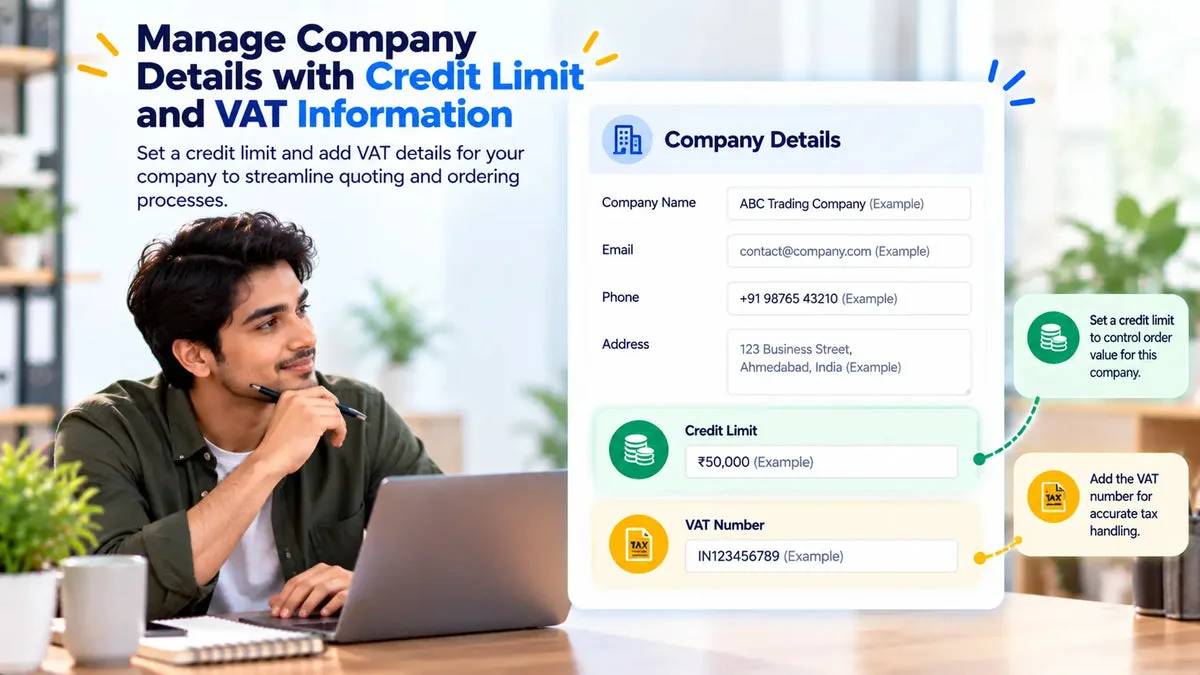
Repeat wholesale buyers can sit on one company record inside the quote app, instead of arriving as a new stranger on every request. Request a Quote and Hide Price stores a company name, a tax ID, a VAT-exempt flag, a credit limit, and contacts, and you can assign quotes to that company. The app is fully free in the catalog.
That record is the app’s company account. The catalog does not say it creates or updates Shopify’s own company object, and it does not write Shopify B2B catalogs. Use it to keep quote history, tax details, and a credit figure next to the quotes you already manage. Use Shopify’s company and catalog tools when you need those native records.
What the company record holds
Create the company once, then attach the people who buy for it. The fields the catalog names are the ones to fill before the second order, not after the fifth.
- Name: the company you will see on quote lists.
- Tax ID: the tax number your invoices and quotes need to show or store.
- VAT-exempt flag: a stored flag for companies you treat as exempt. Confirm the tax lines on any draft order before you invoice.
- Credit limit: a figure on the company for your sales control.
- Contacts: the people grouped under that company.
Assign each new quote to the company when it belongs to them. The admin can list quotes per company, so a returning buyer’s open, accepted, and rejected quotes are in one place. You can also merge quotes, combining more than one quote into a single quote when a buyer has sent separate requests that should be priced together.
Statuses on those quotes follow the app’s workflow: Pending, Opened/Sent, Sent, Accepted, Rejected, and Ordered. The company list is a filter on that history. It is not a second storefront.
Use the credit limit as a sales check
The credit limit is a number on the company record. Put the limit your finance team already uses, in the currency you use to judge the account. Before you accept a large counter-offer or convert a quote to a draft order, open the company and compare the new quote with that figure and with the other open quotes on the company list.
The catalog does not say the credit limit blocks checkout, blocks Add to Quote, or stops a draft order from being created. A quote can still be sent, accepted, and converted if a person does those actions. The limit helps the person decide. If you need a hard stop in Shopify checkout, that stop has to come from a control this catalog does not document.
Automation rules can auto-accept, auto-decline, or auto-send from grand total, discount percent, or quantity. Those rules are quote-level thresholds. The catalog does not say they read the company credit limit. Keep the limit as a human check, or pair it with a total threshold only if that threshold matches the policy you want.
Store VAT details without calling this a Shopify catalog
The tax ID and the VAT-exempt flag belong on the company so the next quote does not ask the buyer to type them again from scratch, and so your team sees them before conversion. When you convert to a draft order, the app adds tax lines. Read those lines against the flag. A stored exempt flag is not, by itself, a description of how Shopify calculated tax on that draft.
Shopify B2B catalogs, company locations, and plan limits are Shopify features. This app’s company screen does not publish prices into those catalogs. A store on any plan can keep company quote records here. A store that also uses Shopify’s companies should treat the two lists as separate until a sync is actually available. This catalog does not document that sync.
Hiding a retail price on the storefront is also separate. Company assignment does not hide a price. Hide-price modes do that job. A logged-in customer is not required for the portal token, and requiring login before Add to Quote does not attach the buyer to a company by itself. Assign the quote to the company in the admin.
A repeat buyer, from the second request onward
A distributor requests a quote in March and another in June. The first time, you create the company, enter the tax ID, set the VAT-exempt flag if it applies, enter the credit limit, and add the contact. You assign the March quote to that company. In June, the same contact requests again. You assign the new quote to the same company and open the company quote list before you counter or convert.
- Confirm the contact is on the company, not a duplicate company with a slightly different name.
- Read the credit limit against open quotes on that company.
- Merge quotes first if June’s request should be one offer with an older open quote.
- Check tax lines at conversion against the VAT-exempt flag.
Keep one company, not three spellings
The usual mess is three records for one buyer: “Northline Supply,” “Northline,” and a personal name. Quotes then split across those records, and the credit limit on one of them never sees the open total on the others. Pick the legal name, put the tax ID on that record, and assign every new quote to it. Merge quotes when the buyer sent two requests that should be one offer. Merging combines the quotes. It does not merge two company records, so fix the company assignment before you treat the credit limit as the full picture.
Contacts on the company are the people who buy. A portal token still belongs to a quote, and the buyer can use it without a store account. When a new contact emails from the same company, add the contact and assign the quote. The catalog does not say the email domain joins the company automatically.
Questions about quote company accounts
Does the credit limit stop an order?
The catalog stores the credit limit on the company record. It does not document an automatic block on checkout, on the quote button, or on draft-order conversion.
Is this the same as a Shopify company?
No sync to Shopify’s company object is documented. The record lives in the quote app, with the tax ID, VAT-exempt flag, credit limit, and contacts the catalog names.
Can two quotes become one company offer?
Yes. Merge quotes combines multiple quotes into one. Assign the result to the company so the history stays on that account.
Create the company on the first serious quote, then assign every later quote to it. The fields are covered on the Request a Quote and Hide Price page. The app listing is Request a Quote and Hide Price.